
✨ What will we do here?
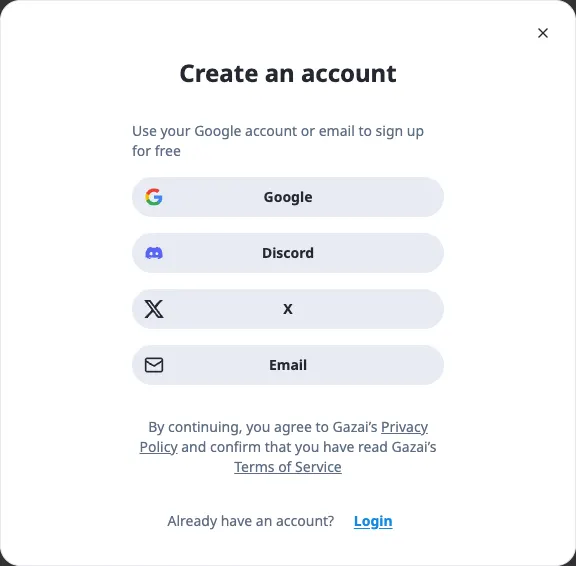
Ready to start creating? The easiest way in is the "Google" button at the top of the list, which logs you in to GAZAI with your Google account. Not a Google person? No problem. Discord, X, and email all work too, so pick whichever feels right and off you go!
🚀 Follow along, step by step!
- Click "Login" at the top of the page: If this is your first visit, click "Sign up" at the bottom of the window to open "Create an account".
- Choose "Google", the first option: Pick the Google account you want to use, then follow Google's on-screen steps to log in or grant access.
- Continue back on GAZAI: Follow the prompts on screen and you're all set. Next time, remember to choose the same Google account!
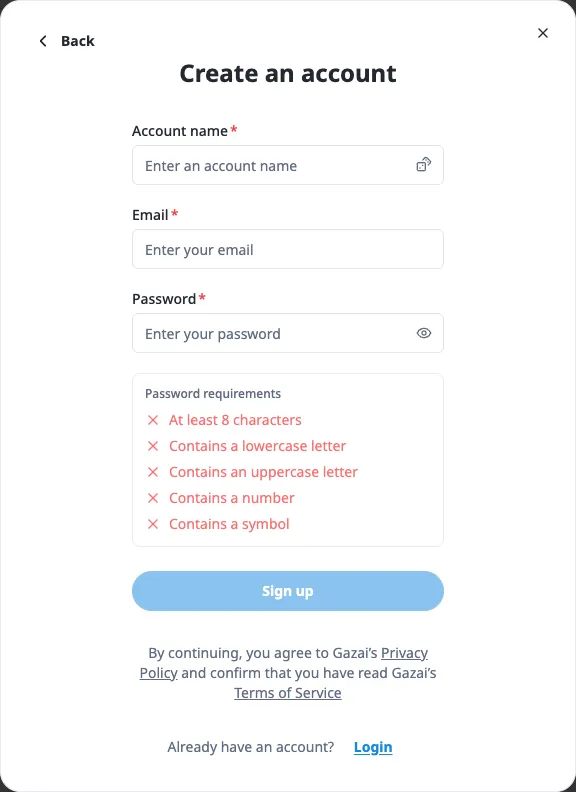
- Prefer not to use Google? Try another way: You can choose Discord, X, or "Email". To sign up by email, fill in the form and complete the verification. If you already have an account, just enter your existing email and password to log in.
- Head back to where you were: Once you're logged in, return to your canvas, image generation, or AI tools and pick up where you left off.
🖼️ Compare with your screen
🛠️ Stuck? Check here first
- Log in the same way you signed up: Make sure the login method and account are the ones you used to create your account.
- Trouble logging in with Google, Discord, or X: Follow the prompts on that service's screen.
- Forgot your password (email accounts): Click "Forgot your password?" to request a reset.
- Didn't get the email?Check your spam folder, and make sure you typed your address correctly.
Quick reminder:Never share your verification codes or password with anyone! Sign-up and verification requirements may change, so go by what you see on screen.